Gene’s Simulator Projects

Driving lamps and other high-draw devices with an Arduino…

by on Mar.30, 2012, under DIY Cockpit Project

First, the video!

A regular Arduino really drive things that have high power requirements or need a voltage higher than 5vdc. In order to run the real displays in the F-15 that use incandescent bulbs, I developed a special board that would allow me to drive up to 16 channels per board, up to 60vdc at round 8A per board.

The Centipede Shield by Macetech provides 64 I/O channels – each of the 64 channels can be configured for input or output. In this context however, I’m using the board as strictly an output device.

Here’s the code that the Arduino runs: centipede_firmware

For those that want to build the driver board, I’ve zipped up the Eagle PCB files for the board – the zip file INSIDE the zip file is “gerber” data that you need to supply to the board house if they don’t natively process Eagle PCB files.

TIP125-Board-v2
Enjoy!

Leave a Comment more...

Hall effect based control inputs…

by on May.08, 2011, under DIY Cockpit Project

For a while now I’ve wanted to replace the crappy, noisy pots that I’d used in my Jentron MK2 gimbal that was in the 109F/X #0 cockpit.  They were so bad that it was impossible to use the gimbal for flight at all.

The best way to replace a mechanical potentiometer is to use a hall effect device.  This is essentially a sensor that will output a 0 to 5v signal based on the position of a magnet.  I’m using the Allegro 1302 for this project.  It works very, very well and can be a direct replacement for any three wire pot installation.

My design uses a 7/8″ (22mm actually) bearing with an 8mm center bore.  The center bore allows you to use a “traditional” Bic pen body as an input shaft.  You can press the body segment into the bearing and it won’t be coming out any time soon!  You can purchase the bearings here: http://www.vxb.com/page/bearings/PROD/SB/Kit1063

I installed the pen body into the bearing and then glued a pair of 1/4″ square neodymium magnets (oriented NS-pen-NS) to either side of the pen body with some thick Cyanoacrylate glue.  Works great!

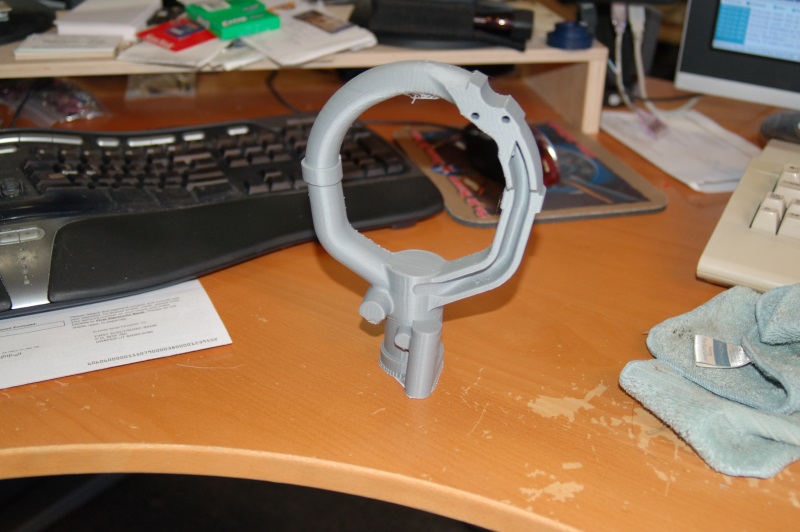
In order to be a direct replacement for the pots, I needed to add similar control arms to them.  I did this by laser cutting a press-fit back plate that I threaded for #4-40 screws.

Here’s the end result so far:

I then bolted it all together and attached the control arms with screws:

The tiny circuit board holds the A1302 hall effect sensor so that it’s in the exact center of the pen body and aligned with the two magnets.

After cutting out the old pots and adding a couple of terminal blocks, the new control inputs were installed:

When connected to the pots, the joystick calibration screen in Windows would show a constant jitter that ran +/- 200-400 around the center point.  With the new A1302 based inputs installed the jitter was ZERO.  I’m really looking forward to getting these installed into the rudder pedals, toe brakes and throttles!

Here’s a more detailed how-to on building these for yourself:


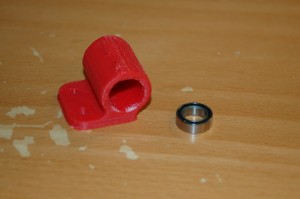
Here’s the parts you need:

The parts shown are a 22MM bearing (just a little shy of 7/8″ diameter), two 1/4 x 1/4 neodymium magnets, an Allegro A1302 hall effect sensor and a Bic pen body.

Using a vice, carefully press in a short segment of pen body into the bearing – do NOT hammer it! The pen body plastic is very brittle. Steady force using a vice will “drift” in the pen body quite easily.

Next, glue the two neodymium magnets to opposite sides of the pen body – the magnets should be oriented N-S (they’d come together if the pen wasn’t in the way). The way I did mine was to rest the magnet on the inner race of the bearing with a business card keeping it from physically touching the race. I then used “thick” CA (cyanoacrylate) to glue the magnets in place – have some kicker handy to speed up the cure process.

You should end up with something that looks like this:

Now you need to build the board that will hold the sensor in place. I used a small slice of copper clad perf-board. This holds the 3 pin connector and the A1302 very well.

Next, you want to get some 1/2″ or 3/8″ plywood and bore a 7/8″ diameter hole in it using a forstner bit. Dont’ bore the hole completely through – leave about 1/8″ of material. Then drill a 1/4″ hole using the same center as the 7/8″ hole. I use a set-screw to hold the bearing in, but you could easily hot-glue it in if you’re careful to keep the glue out of the bearing races. Tape the bearing in for now so you can align the hall sensor properly. A properly aligned sensor will fit in the center of the pen body with the magnets on either side of it.

You should end up having something that looks like this:

Assembled, it should look like this:

You can connect any kind of pushrod arm, gear, or whatever to the pen body – just don’t apply too much side force to it. Too much side stress will crack the plastic. This setup gives 180 degrees of usable travel and works very well! The bearing size that you get should have an inner diameter just a tiny bit less than the widest point on the hexagonal Bic pen body. This allows for a very tight friction fit that doesn’t require any adhesive to hold it in place.

You can easily custom design your own bracket for this – this was a simple prototype that proved out the technique and a refined version will end up in my ’109 as well as a replacement for the pitch axis sensor I screwed up in my BRFS gimbal build. smile

6 Comments more...

Driver board update…

by on Nov.25, 2010, under DIY Cockpit Project

Just before heading off for what I suspect will be a “nom-fest”, I wanted to post a picture of my new 16 channel driver board:

It doesn’t look like much, but this is what I’ll use in the F-15 to drive all the indicator lamps.  The board is designed to be directly connected to the Centipede Shield by MaceTech.

There is an error on the board – though.  Can you spot it? :D

Happy Thanksgiving!

3 Comments more...

From the “That’s Impossible!” dept…

by on Nov.21, 2010, under DIY Cockpit Project

The world’s first amateur built cross-cockpit collimated video display system:

This is a 60 degree wide by 40 degree high spherical section collimating mirror.

More information can be found here: http://www.diy-cockpits.org/coll/collimated_display.html

Until yesterday (11/20/2010) this kind of thing was the sole domain of multi-million dollar commercial flight simulators.  Not. Any. More. :D

Thanks all!

g.

5 Comments more...

Series One DIY cockpit plans…

by on Sep.12, 2010, under DIY Cockpit Project

..are now DonationWare!

You can download the 386MB ISO from here.

There’s no difference in the content between the commercial edition that I was selling and this one, with the exception of the cost.  It’s purely donation-ware at this point.  Pay what you feel it’s worth to you!  From nothing to One Beeeeeelyun Dollllaarrrs! *laughs*

This edition contains three supplementary drawing sheets that were not included in the original release, including parts for a sub-deck in the front of the cockpit and new parts for flatter fuselage sides that are easier to skin.

Thanks All!

17 Comments more...

A need for speed….

by on Aug.15, 2010, under DIY Cockpit Project

(Read the prior blog entry to this for details on the projector stands)

After completing the projector stands it was time to finally use the damn things! :)

Because of the flexibility of modern games and the popularity of “triple head gaming”, new games like Need for Speed: Shift support the resolutions that can be found using a TripleHead2Go.  In my case that’s 3072×768 because I’m using three 1024×768 projectors.

My friend Dave is a nut for this game and I finally understand why. It’s insanely fun to play on a 180 degree wraparound display. :D

Here’s how it was set up:

The projectors are configured in a “cross fire” setup.  This means that the projector on the left is handling the arc on the right, and the right side projector is handing the arc on the left.

The projectors are set up to give a roughly 6″ overlap to each other in order for the screen to be blended properly.

I use a program called Nthusim that will allow me to distort and align the projected image in order to make it seamlessly conform to the curved screen.  It works VERY well.

In order to get Nthusim set up, you need to set it up in configure mode and start adjusting things:

Those white lines are where the alignment points are.  At the ends and intersections of each lines is a point that you can drag with the mouse in order to make the image conform to the screen.  Unfortunately this only works in programs that use DirectX and OpenGL, but not the 2D desktop.  Makes life interesting when you’re just working with the desktop. :)

The pictures are very blurry because I took them in a totally dark room with my DSLR.  Because I didn’t have a tripod handy, I had to hold as still as I could while the shutter was open – in those and some following images, the shutter open time was a full second or more!

Here’s three more pics that show Need For Speed: Shift in it’s widescreen gaming glory.  My friend Dave is at the controls. (he drives better than I do)

Here’s a short video showing it in action.  Unfortunately my Flip Video camera has VERY poor low-light performance.

Here’s what the car “sim” looks like:

Thanks for reading!

Leave a Comment more...

New projector stands completed!

by on Aug.15, 2010, under DIY Cockpit Project

As of yesterday, (14Aug10) the new projector stands are finished and they turned out great!

I got this idea after the last setup I’d done last month – it turns out it works just as well as I’d hoped.

The projector stands were built from 3/4″ plywood and 2×4′s for the legs.  The support box is designed to hold a 3.5″ PVC pipe that acts as the actual support for the projector.  This allows the projector to rotate left and right very easily.  The height of the projector can be adjusted using a “step” pin that the PVC can rest on.  The series of holes you’ll see in the sides of the support box are for those pins.

Here’s what the interior of the projector stand looks like:

The column is right around 42″ inches high or so.  The box is built using “splines”.  Basically you cut your box sides at a 45 degree angle and then leaving the blade at 45 degrees, you flip the part around and cut a channel along the length of the 45 degree cut.  By doing this you can insert a “spline” or long thin length of material into the slot that will act as a reinforcement to the joint.  It results in a very strong box when you’re done.  I used 1/8″ hardboard strips as the spline material as it’s nearly the same thickness as the blade kerf (the width of the cut made by the blade) on my table saw’s current blade.

The inserts you see are there to support the PVC pipe.

The top of the box is capped with a 3/8″ thick sheet of Baltic Birch.  With a 45 degree chamfer on it, it looks very nice:

Mounted on top of the PVC pipe is a “yoke” that the projector itself will ride in.  The center line of the yoke matches the center line of the stand in order to maximize the stability of the setup.  The mounting points on the projector are located at it’s lengthwise balance point.

Here’s the three stands prior to mounting the projectors:

The yokes have an odd shape in order to ensure that even at an extreme down-angle, the VGA connector on the projector will still be easily accessible.

Here’s the projectors mounted up – this is as “low” as they’ll go.  The PVC is currently resting on the crossbeam that’s formed by the 2×4 legs.

That’s all for now.  Thanks for reading!

1 Comment more...

Gazoutta16 is complete!

by on Aug.06, 2010, under DIY Cockpit Project

The 16 channel output board I’ve been working on is now finally completed!

This is a render of the final version of the board – this version has been sent off to a PCB house for manufacture (blank boards only):

This board will provide 16 channels of output, up to 500mA per channel at up to 30VDC.  The board costs about $20 in parts to make.  I’ll likely sell any spare blank boards I have for $10 each.  I don’t offer them as an assembled device or as a complete kit.

The link below is for a zip file that contains everything you need to build your own Gazoutta16 board, including the schematics, board layout and the firmware source code.  It’s based on the Arduino software stack (http://www.arduino.cc)

gazoutta16_project

If you have any questions, you’re welcome to contact me at the address given in the readme.txt file in the archive file listed above.

Thanks!

Leave a Comment more...

Update on the screen project…

by on Jul.02, 2010, under DIY Cockpit Project

Short video:

The screen has a diameter of 15 feet with a usable circumference of about 30 feet.  Like its predecessor, the new screen is 78″ tall.

The glue still needs to dry before I do any finish work on it.  I’m going to either hit the local fabric store for some white muslin, or Home Depot for a couple of more drop cloths.  I haven’t decided yet.  Eventually, I’ll pony up for commercial grade screen material, but that will have to wait for funds to be available. :D

Leave a Comment more...

LCD details and the screen build is started…

by on Jun.10, 2010, under DIY Cockpit Project

Here’s what the last panel for the projector looks like after being installed into the plywood frame.

Here’s a pic of the LCD controller and the power supply:

Having all three projectors done is a great step to get completed.

Here’s the “Stack”

I still need to get the supports for those built, but that will have to wait until this coming Saturday.

I got six of the screen segment frames assembled last weekend.  This sucker is a lot bigger in real life than it was in AutoCAD…

Each segment is about 63″ wide as measured straight across.  Each 2×4 leg is 95″ long.  It’s BIG.

I used some canvas drop cloth as a screen so I could check out a few things.  Here’s what that looked like:

The stupid plasma MM2 is either acting up on me or the “deal” I got on the pots I used on the controls is coming home to bite me.  I’m not sure which…

Until next time!

Leave a Comment more...

Looking for something?

Use the form below to search the site:

Still not finding what you're looking for? Drop a comment on a post or contact us so we can take care of it!

Visit our friends!

A few highly recommended friends...